Give every pay run
a clearer starting point
Bring employee information, attendance inputs, salary structures, and payslips together so every pay run has a dependable record.
Global Coverage
Keep the configured pay information for each workforce together.
Automated Payroll
Prepare each pay run with earnings and deductions in one place.
Compliance Ready
Review the tax and statutory rules configured for the pay cycle.
Real-time Sync
Reflect approved employee changes in payroll inputs.
Better Employee Experience
Give employees a clear place to view pay information.
Payroll Processing
Accurate, compliant and effortless payroll for your growing team.
Automate payroll calculations, manage deductions, and ensure on-time payments — all in one secure platform.
 View full size ↗
| Employee | Department | Net Pay | Status |
|---|---|---|---|
| AS Aarav Sharma | Engineering | &x20B9; 1,25,000 | Paid |
| NV Neha Verma | Marketing | &x20B9; 92,000 | Paid |
| RM Rohan Mehta | Design | &x20B9; 88,000 | Paid |
Key Features
View All Features →Automated Calculations
Accurate salary, tax, and deduction calculations.
Multiple Pay Schedules
Run payroll monthly, bi-weekly or custom cycles.
Tax & Compliance
Stay compliant with local tax laws and regulations.
Direct Bank Transfers
Secure and on-time salary disbursements.
Custom Deductions
Manage PF, ESI, loans and more.
Detailed Reports
Generate and export payroll reports with ease.
Why Choose Our Payroll?
- Saves hours of manual work
- Reduces payroll errors
- Supports multi-country payroll
- Ensures legal compliance
- Scales with your business
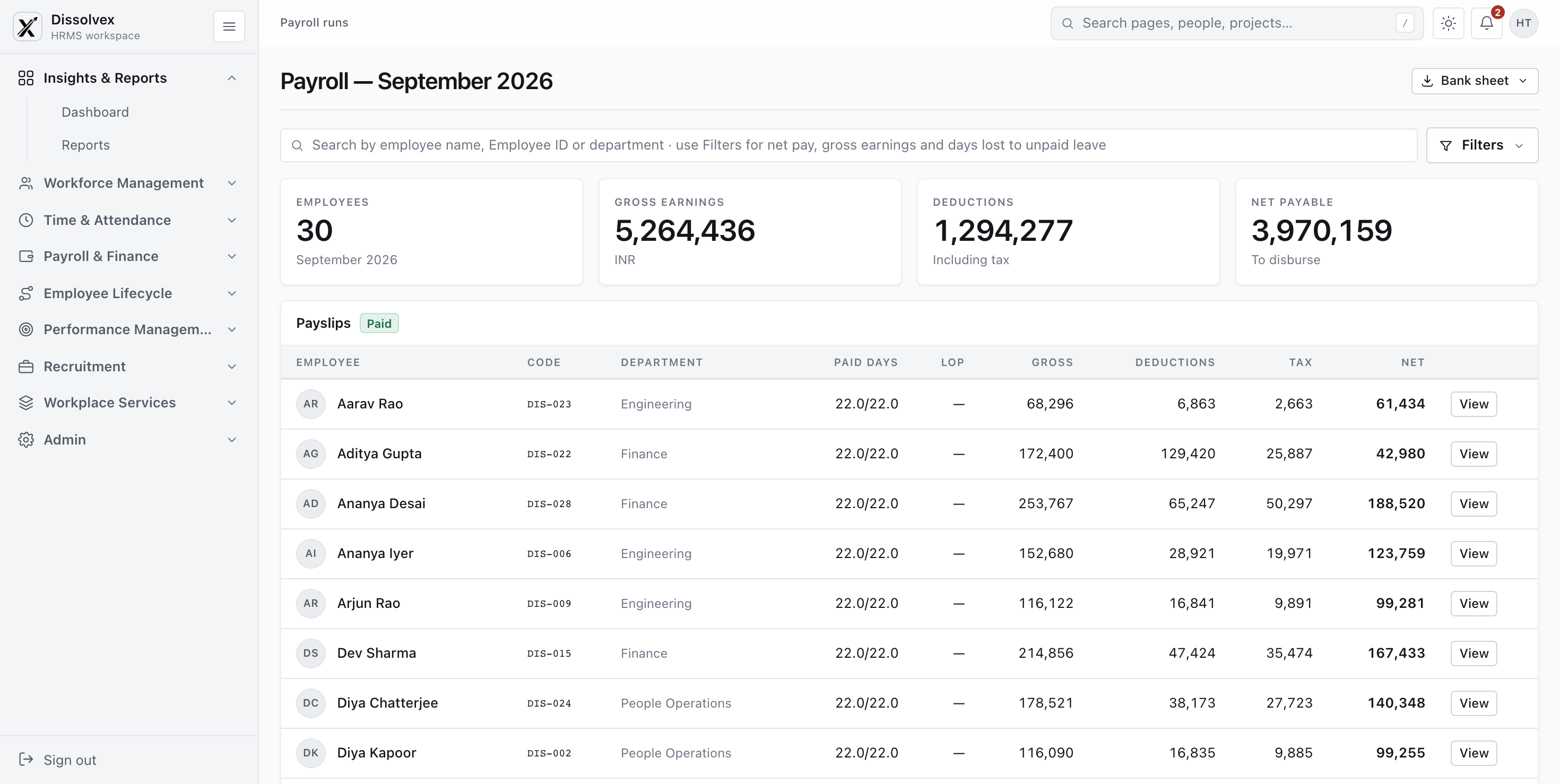
Build every package on a clear salary structure
Define earnings and deductions once, then see exactly how each component contributes to monthly CTC before assigning a structure to employees.
- Keep basic pay, allowances, and deductions together
- Preview percentage-based and fixed components
- Apply a consistent structure across employees
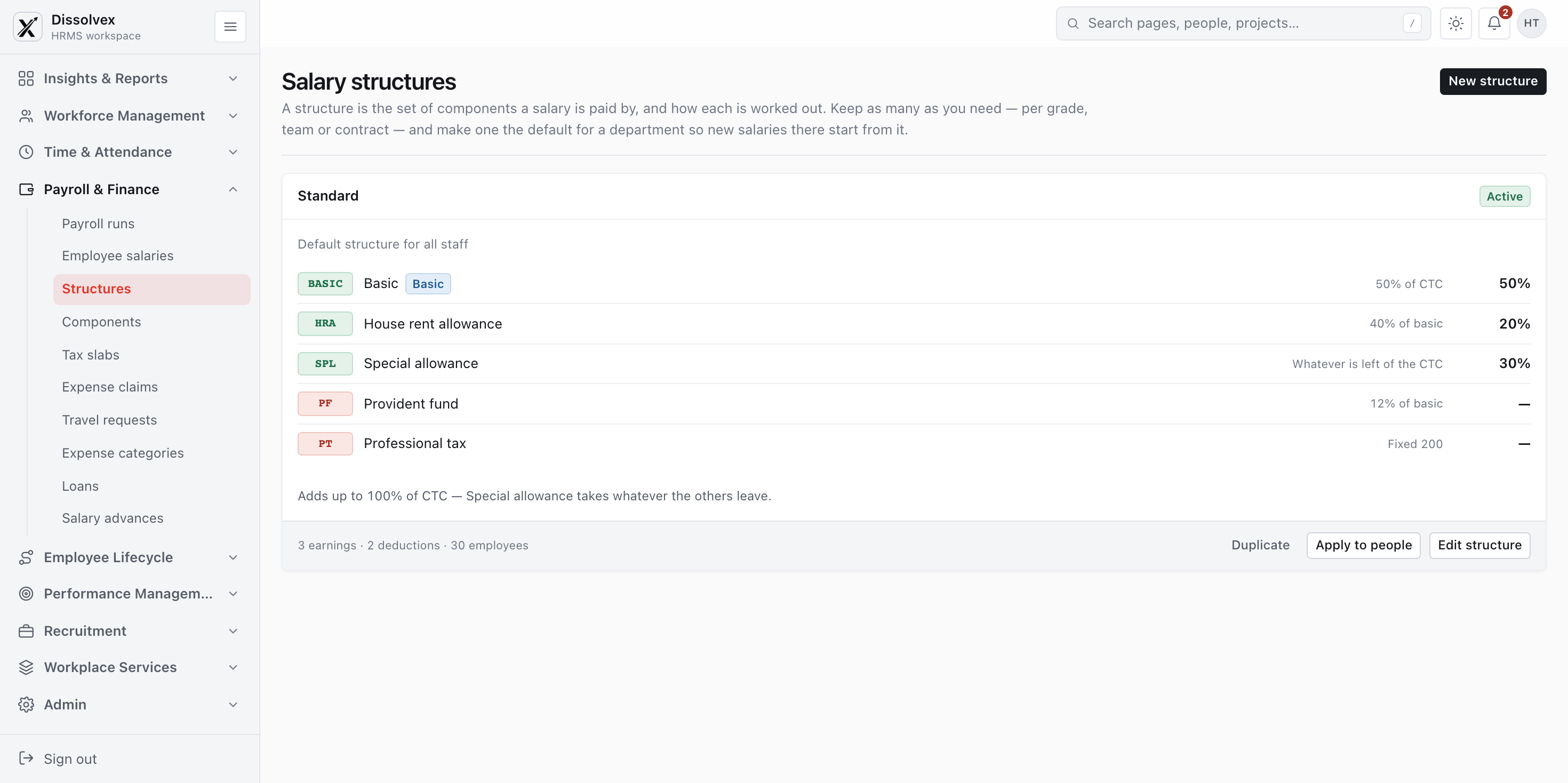
Understand exactly where pay goes
Review the components behind every payslip, including allowances, fixed deductions, and the share of monthly CTC assigned to each earning.
- Separate earnings from deductions
- Visualize the monthly CTC split
- Spot unallocated CTC at a glance

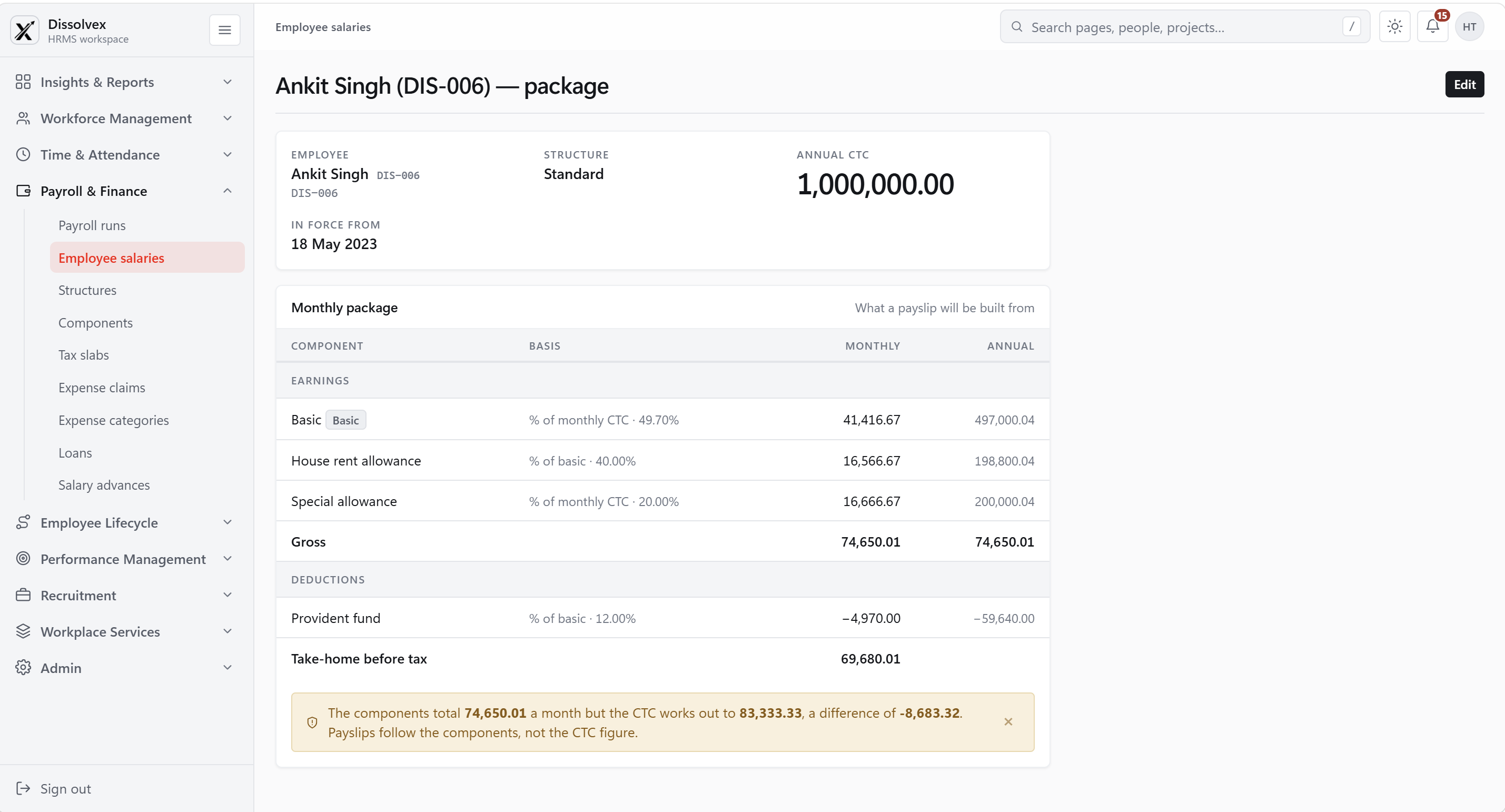
See the full story behind each employee's pay
Open an employee package to review annual CTC, effective date, monthly earnings, deductions, and estimated take-home pay in one place.
- Connect each employee to the right salary structure
- Review monthly and annual component amounts
- Catch package differences before a payroll run
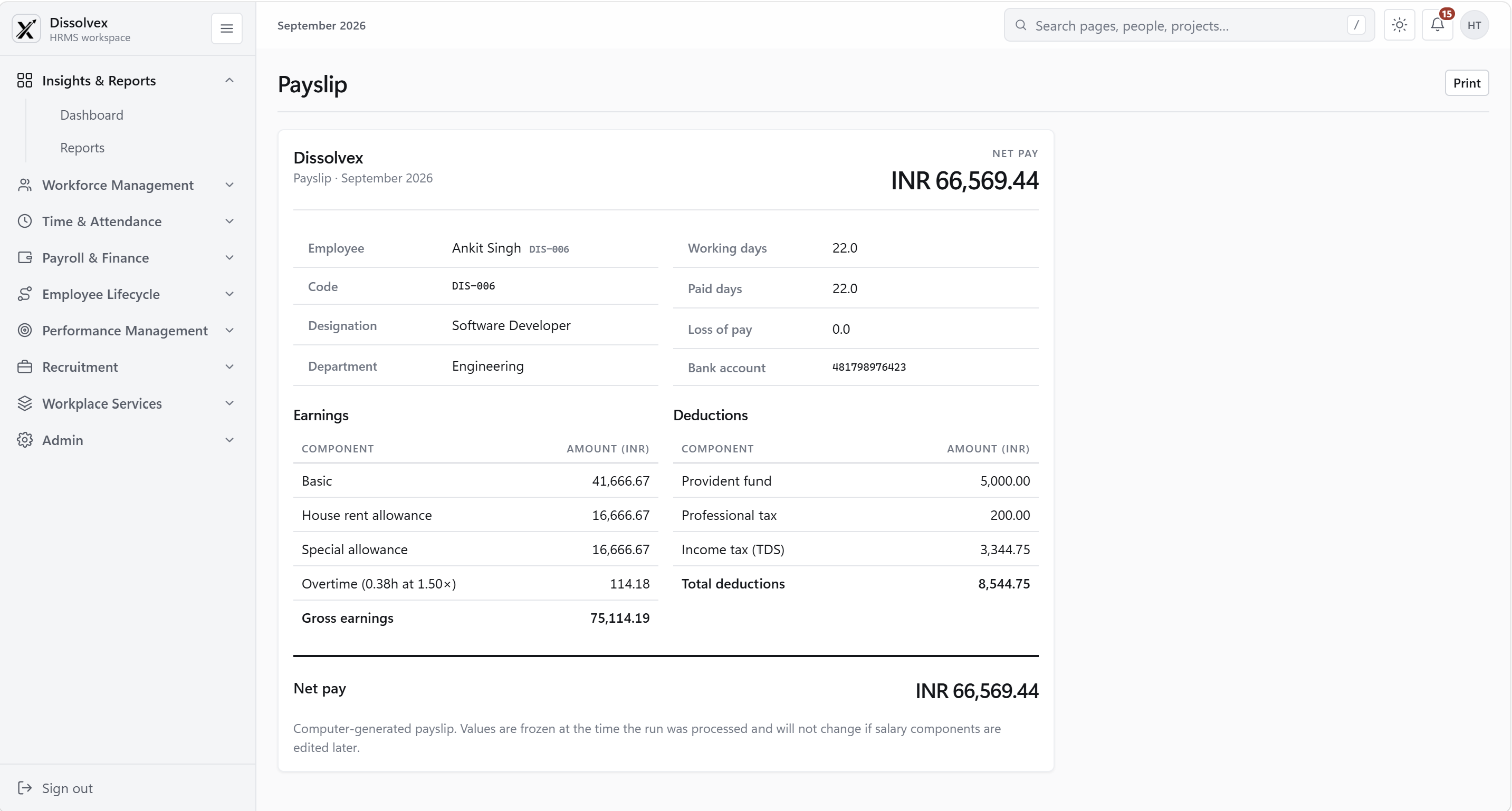
Give every payday a complete breakdown
Show paid days, earnings, deductions, and final net pay together so employees can understand how their monthly amount was calculated.
- Itemized earnings and deductions
- Paid days and loss-of-pay context
- Print-ready record for each payroll period
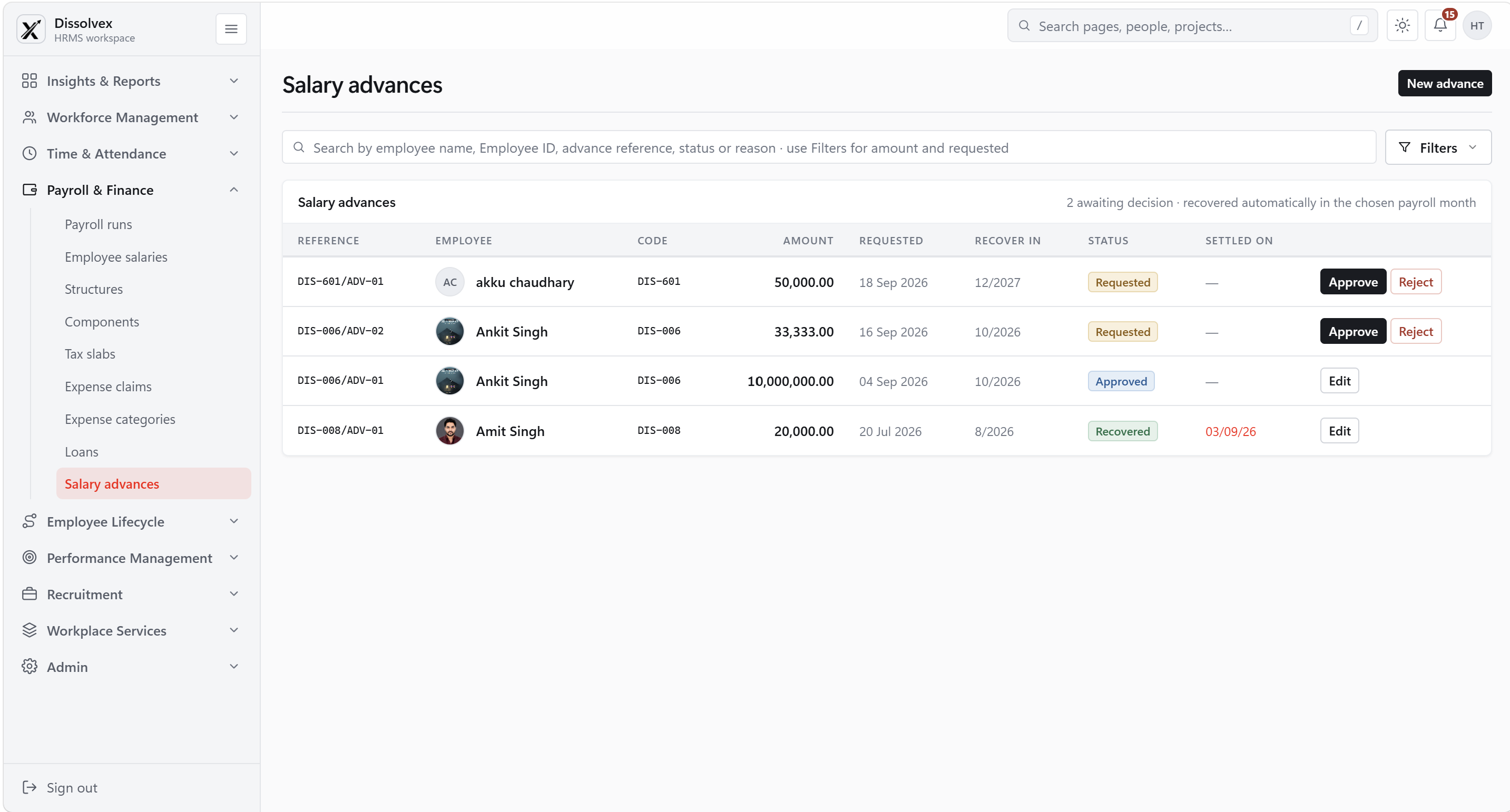
Keep advances and recovery easy to follow
Review advance requests, approve an amount, and track the payroll month selected for recovery without losing the history of each request.
- Request, approval, and recovery status in one view
- Planned recovery month beside each amount
- Clear records for HR and payroll teams
Keep employee changes connected to payroll
Keep the employee fields payroll needs aligned with the latest HR record.
Review payroll rules with confidence
Review the configured tax, benefit, and deduction rules as part of each pay cycle.
Prepare pay runs with less manual work
Use approved attendance, loss-of-pay, and overtime information when preparing payroll.
Give employees easy access to pay records
Let employees find payslips and related pay information through their own portal.
Use connected HR data throughout the employee journey
Use employee changes from onboarding through exit without rebuilding the payroll record.
Frequently Asked Questions
Answers about the information behind a pay run and what employees can see.
How to connect & get started?
Login to your account →Approved attendance, loss-of-pay, and overtime records can be included when the run is prepared.
Employees can review available payslips and pay details through their portal.
A salary structure groups the earning and deduction components used to calculate an employee's pay.
Approved reimbursements and recoverable advances can be reflected in the appropriate payroll cycle according to their configured status and month.
The run summary and employee-level figures help the team check gross earnings, deductions, tax, and net pay before preparing payment information.
Processed payslips keep the values calculated for that run, providing a record of what was paid at the time.
Make every payday easier
to review and process
Calculate configured earnings and deductions, review the run, and prepare the information needed for payment.
A few cookies, and nothing more
Our website and the HRMS use what they need to work, plus two optional settings. No analytics, no advertising, no tracking.
What this stores
- dissolvex_sessionid
- Keeps you signed in to your workspace · 12 hours
- dissolvex_csrftoken
- Stops other sites sending forms as you · 1 year
- dissolvex_consent
- Remembers the answer you give here · 6 months
- dvx-session
- Signs out every open tab when you sign out of one · no personal details, just an account number
- dissolvex.navScroll
- Keeps the sidebar where you left it · this tab only
- dissolvex_nav_scrolled, dx-footer-active-link
- Keep the website's menu steady between pages · this tab only
- Razorpay
- Its own, inside the payment window, to take a payment safely · only when you pay
What this stores
- dissolvex_theme
- Light or dark mode · 1 year
- dvx-panel
- Whether you folded the sidebar away · until you clear it
Turned off, the HRMS still works — it just goes back to your device's light or dark setting, and the sidebar opens each time.